
IMEI and serial number tracking for warranty and returns
Why a mobile or electronics shop should track each unit by IMEI or serial, what to record, how to check warranty and how to handle a unit that comes back.
In this article
A customer brings in a phone and says he bought it from you eight months ago. The screen has stopped working. Is it your unit, when did it leave your shop, and is it still under warranty? If your register only says "Model X: 6 pieces", you cannot answer. If it lists every unit by IMEI or serial number, you can answer in a minute.
Why counting is not enough for phones and appliances
For biscuits and soap, a count is enough. A phone, a television or a washing machine is different: each unit has its own number, sale date and warranty, and disputes are about one particular unit.
- Warranty claims. You need the sale date of that exact unit, not the date you sold the model in general.
- Returns and swaps. You need to know that the unit coming back is the one you sold, and to whom.
- Supplier claims. The distributor will ask for the serial and when you received it.
What to record for each unit
Keep one line per unit, in a notebook, a spreadsheet or software:
| Field | Why you need it |
|---|---|
| IMEI or serial number | The identity of the unit. Type it carefully or scan it from the box. |
| Item and model | So you can find all units of one model. |
| Date received and supplier bill number | For claims with your supplier. |
| Date sold and invoice number | The start of the customer's warranty. |
| Customer name and phone | So you can match the person to the unit later. |
| Warranty period in months | So you can work out when cover ends. |
| Status | In stock, sold, returned or written off. |
*#06#. Pick one, usually the first one printed, and use that same one every time you record a unit. Recording IMEI 1 on purchase and IMEI 2 on sale makes the unit look like two different phones.Put the serial on the bill
Write the IMEI or serial on the invoice line for every serial-tracked item you sell. Both copies then prove which unit was sold. More billing tips for phone shops are in billing for mobile and electronics shops.
Say you run a mobile shop and receive 10 units of one model at ₹14,500 each. You record all 10 IMEIs as they come in. You sell 7, each with its IMEI on the invoice. Your list now shows 7 sold, each with a customer and date, and 3 in stock. If the shelf has only 2, you know at once which IMEI is missing, not just that one is short.
Working out how much warranty is left
Count calendar months from the sale date. Say you sold a phone on 15 March 2026 with a 12-month warranty. Cover runs until 15 March 2027. If the customer comes in on 14 November 2026, there are 121 days left: 16 days to the end of November, then 31, 31, 28 and 15.
When a unit comes back
- 1Find the unit by its number. Check that the IMEI on the phone matches one you sold, and to this customer.
- 2Check the sale date and warranty. Decide whether it is a warranty case, a return or a paid repair.
- 3Write down why it came back. "Screen flicker" or "changed mind" is enough.
- 4Decide where the unit goes. If it is in perfect condition, it can go back on the shelf. If it is faulty, keep it out of sellable stock and send it to the supplier or service centre.
- 5Record the refund you actually gave, or zero for a straight swap.
For the full procedure, including how a return affects your profit, see how to record a sales return.
How InvoiceKaro handles serial numbers
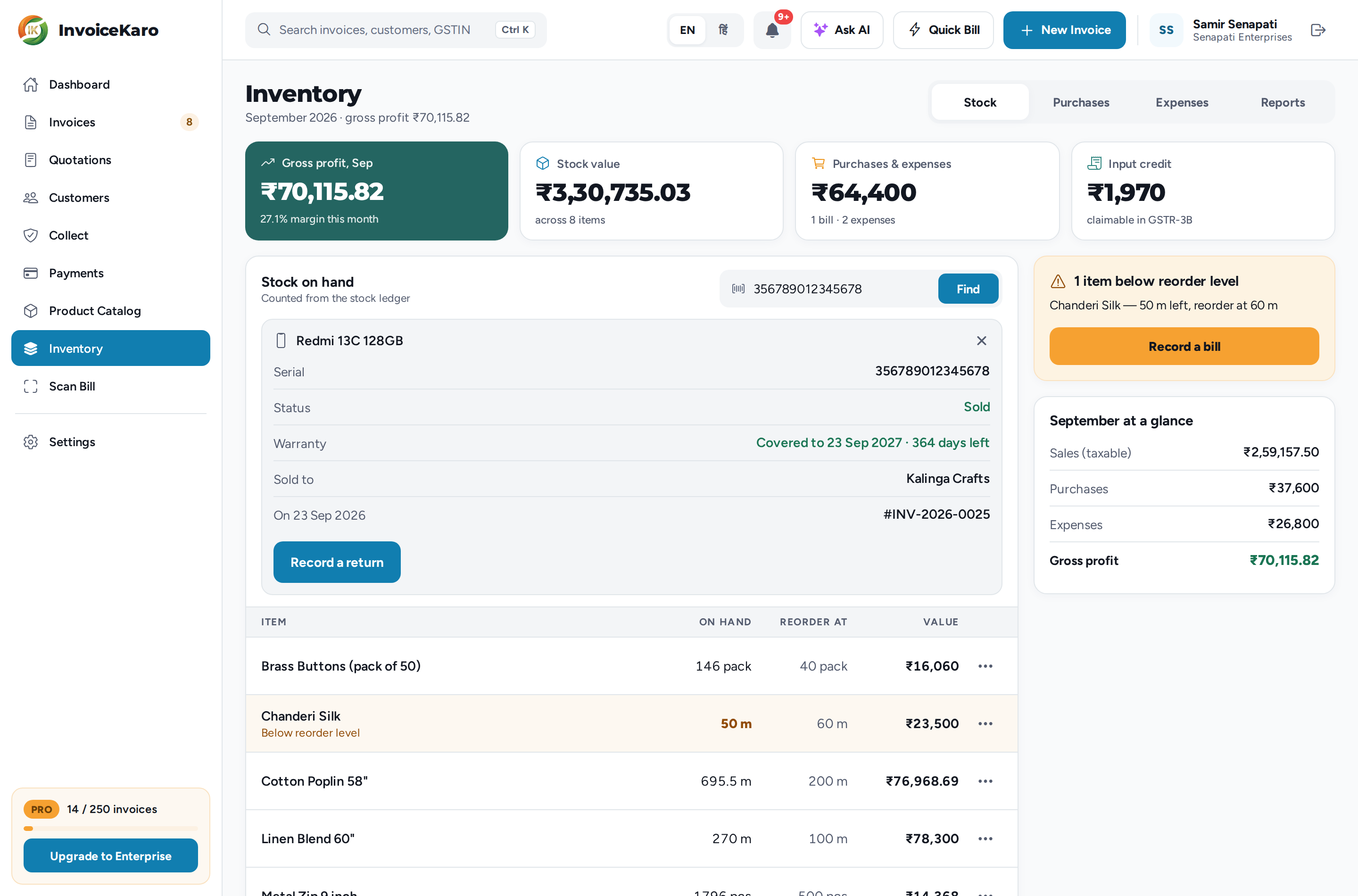
In InvoiceKaro you mark an item in the catalogue as Each unit has an IMEI / serial and set its Warranty (months). You add serials from the Stock tab, up to 500 at a time, and a serial already on record is reported back instead of added twice. Adding serials also adds those units to the stock count, so if the same units already came in as opening stock or on a purchase bill, the count will be too high and the owner corrects it with Adjust.
When you sell, you enter the serials on the invoice line. This works on a full invoice only: Quick Bill does not ask for serials. Type or scan a number into Find an IMEI / serial and you see the unit's status, who bought it on which invoice and date, and an estimate of the warranty left, counted from the sale date. From there the owner, an admin or a manager can Record a return with a reason and a refund amount, and choose whether the unit goes back on the shelf. The serial numbers guide has every step.
Common questions
What is the difference between an IMEI and a serial number?+
How do I find the IMEI of a phone?+
*#06# on the phone or look at the box label, and check that the two match before you record it.