Billing for mobile and electronics shops: IMEI, warranty, accessories
How a mobile or electronics shop should bill handsets and accessories, put the IMEI on the bill, settle warranty disputes and keep high-value stock in order.
In this article
Eight months after a sale, a customer walks in with a phone that will not charge and says he bought it from you. Maybe he did. Maybe it came from the shop across the road. In a mobile or electronics shop, the bill that settles this argument is the one that carries the IMEI or serial number of the exact unit you sold.
Two kinds of sale, two kinds of bill
A mobile shop runs two businesses at one counter. Handsets, TVs and appliances are high-value items where each unit is different. Covers, chargers, earphones and screen guards are low-value items where every piece is the same. Bill them differently.
| Handsets and appliances | Accessories | |
|---|---|---|
| Typical price | ₹8,000 to ₹80,000 | ₹99 to ₹1,500 |
| What identifies the item | IMEI or serial number of the unit | Item name or barcode |
| What goes on the bill | Customer name and phone, model, IMEI or serial, warranty period | Item and quantity |
| How to bill | A full invoice in the customer's name | A quick counter bill is enough |
| What to track | Each unit | The count |
Worked example: a customer buys a phone for ₹18,999, a back cover for ₹299 and a tempered glass for ₹199. The phone goes on an invoice with the customer's name, phone number and the handset's IMEI. The two accessories can go on the same invoice, as ordinary lines. Total: ₹19,497. If he pays ₹15,000 by UPI and ₹4,497 in cash, record both payments separately so your UPI app and cash drawer each match.
The typical dispute: warranty and 'not my phone'
Most arguments in an electronics shop come back to one of three questions: did this unit come from us, when was it sold, and is it still under warranty? A paper bill book with 'Redmi, black' written on it answers none of them. A bill with the IMEI answers all three.
- Write the IMEI or serial at the moment of sale. Scan it from the box or type it. Never fill it in later from memory.
- Record the warranty period with the model. For example 12 months for a handset and 6 months for a charger, as the manufacturer states. The warranty clock starts on the sale date.
- Check the manufacturer's actual terms before you promise anything. Your record shows the date; the brand decides what the warranty covers.
- Keep the customer's phone number on the bill. It is the fastest way to find the sale again.
The typical record-keeping problem: high value, low count
A kirana can lose ten packets of biscuits and barely notice. A mobile shop that loses one phone has lost ₹18,000. The stock count is small but every unit matters, so the count has to be exact.
- 1When stock arrives, record each unit's IMEI or serial against the supplier bill. If the supplier sends 10 handsets, you should have 10 numbers on record.
- 2When you sell, the unit leaves the list. Your stock of that model is the list of numbers still on the shelf.
- 3Once a week, match the shelf to the list. Scan every boxed handset and compare. Any number on the list but not on the shelf needs an answer the same day.
- 4Record returns and replacements as their own entries. Do not edit the original bill. Write down which unit came back and whether it can be sold again. See how to record a sales return.
Mistakes to avoid
- Billing a phone on a quick counter slip. It has no customer name and no IMEI, so it cannot help in a warranty claim.
- Selling a display piece without noting it. Record which unit was on display so a customer complaint about scratches has an answer.
- Treating every accessory as a separate customer bill. Accessories bought with a phone belong on the phone's invoice.
- Never counting accessories. Small items go missing quietly. Count your top accessories once a month.
How InvoiceKaro handles this
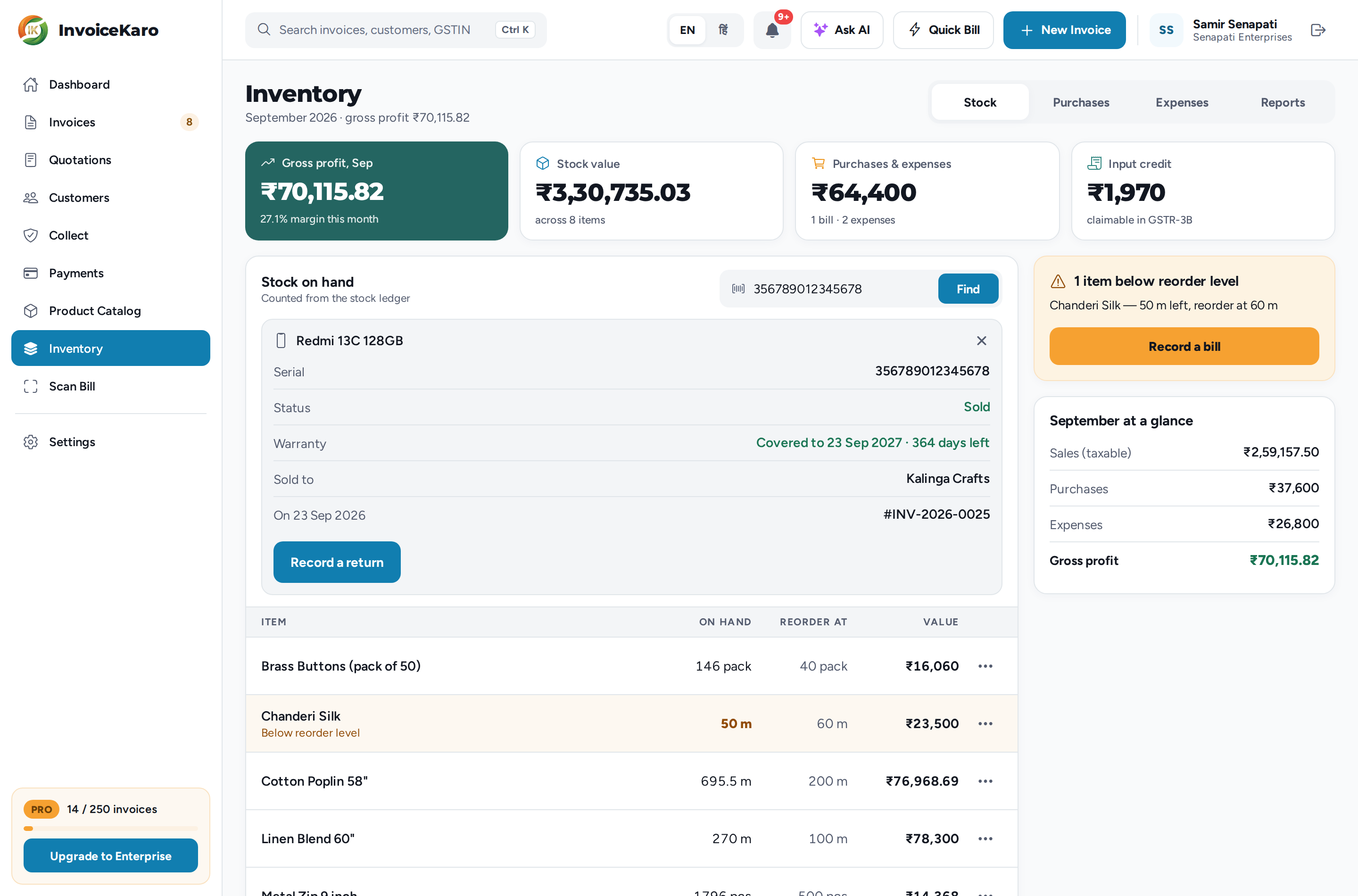
In the Product Catalog you can mark an item as Each unit has an IMEI / serial and set its Warranty (months). Serials are added in Inventory → Stock with Add serials as stock arrives; each serial added also adds one unit to the count, so if the same units came in on a purchase bill, correct the count with Adjust. On a full invoice the line for that item has an IMEI / serial numbers field. When the invoice is issued, those units are marked sold and linked to it.
The Find an IMEI / serial lookup shows a unit's status, who bought it on which invoice, and an estimate of the warranty left, counted from the sale date. A return can be recorded from the lookup. Serial numbers are entered on full invoices only: Quick Bill does not ask for them, so keep it for accessories. The detailed walkthrough is in IMEI and serial number tracking.