
Quick Bill: ring up a walk-in sale in seconds
How to bill a walk-in customer fast: tap items, take cash or show a UPI QR with the amount filled in, print a thermal receipt and move to the next sale.
In this article
A customer is standing at your counter with two items and a ten-rupee note of patience. A full invoice form, with customer name, place of supply and payment terms, is the wrong tool for that moment. Quick Bill is the screen built for it.
This guide shows how a counter sale works in InvoiceKaro from the first tap to the printed slip, what gets recorded behind it, and a few habits that keep a busy counter moving.
Why a counter needs its own billing screen
A normal invoice asks who the buyer is, where they are and when they will pay. Those questions matter when you sell on credit to another business. At a shop counter the answers are always the same: a walk-in customer, here, paying now. Every extra field is time the next customer spends waiting.
- No customer form. The sale is billed to a walk-in customer, so you do not add a contact for someone buying biscuits.
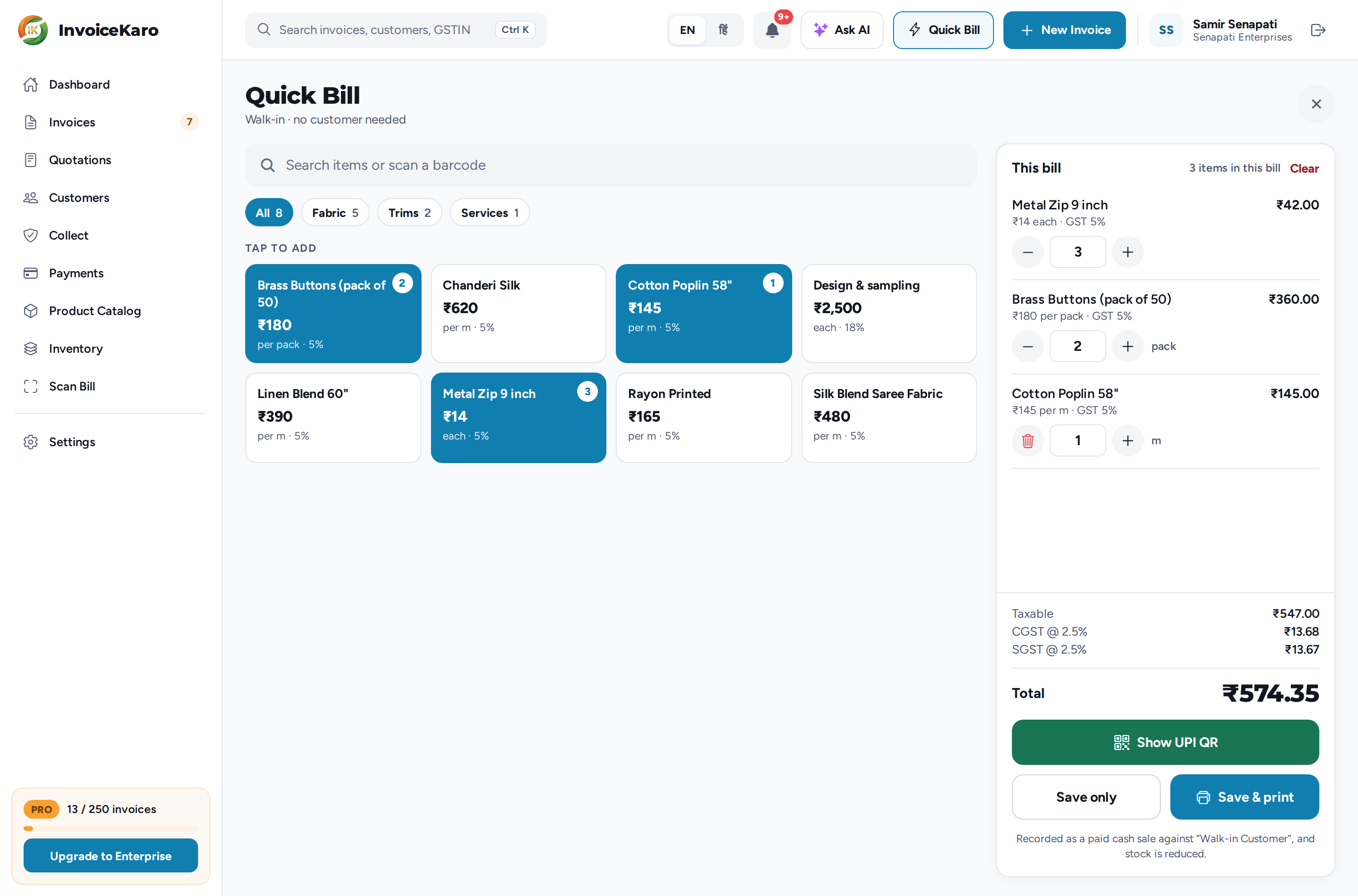
- Items as tiles. Your catalogue appears as buttons grouped by category. One tap adds an item, a second tap adds one more.
- The total in large type. Taxable value, CGST, SGST and the total sit at the bottom, big enough to read across a counter.
Ring up a sale, step by step
- 1Open Quick Bill. On a phone, tap Quick Bill on the floating button; a Services business opens it from More. On a computer it is in the left menu for the Retail layout and in More for Services and Both, and every layout except Services also has it in the top bar.
- 2Add the items. Tap the tiles, or type in Search items or scan a barcode. A USB barcode scanner plugged into a computer works here: it types the code and presses Enter, which adds the matching item.
- 3Fix quantities. Use − and + on a line or type the number. Decimals work, so 2.5 metres of cloth or 0.75 kg is fine. Taking a line to zero removes it.
- 4Take the money. For cash, press Save & print. For UPI, press Show UPI QR and let the customer scan.
- 5Serve the next customer. The cart clears as soon as the bill is saved. The last bill stays on screen as a small card in case the printer jammed and you need to print it again.
Taking UPI at the counter
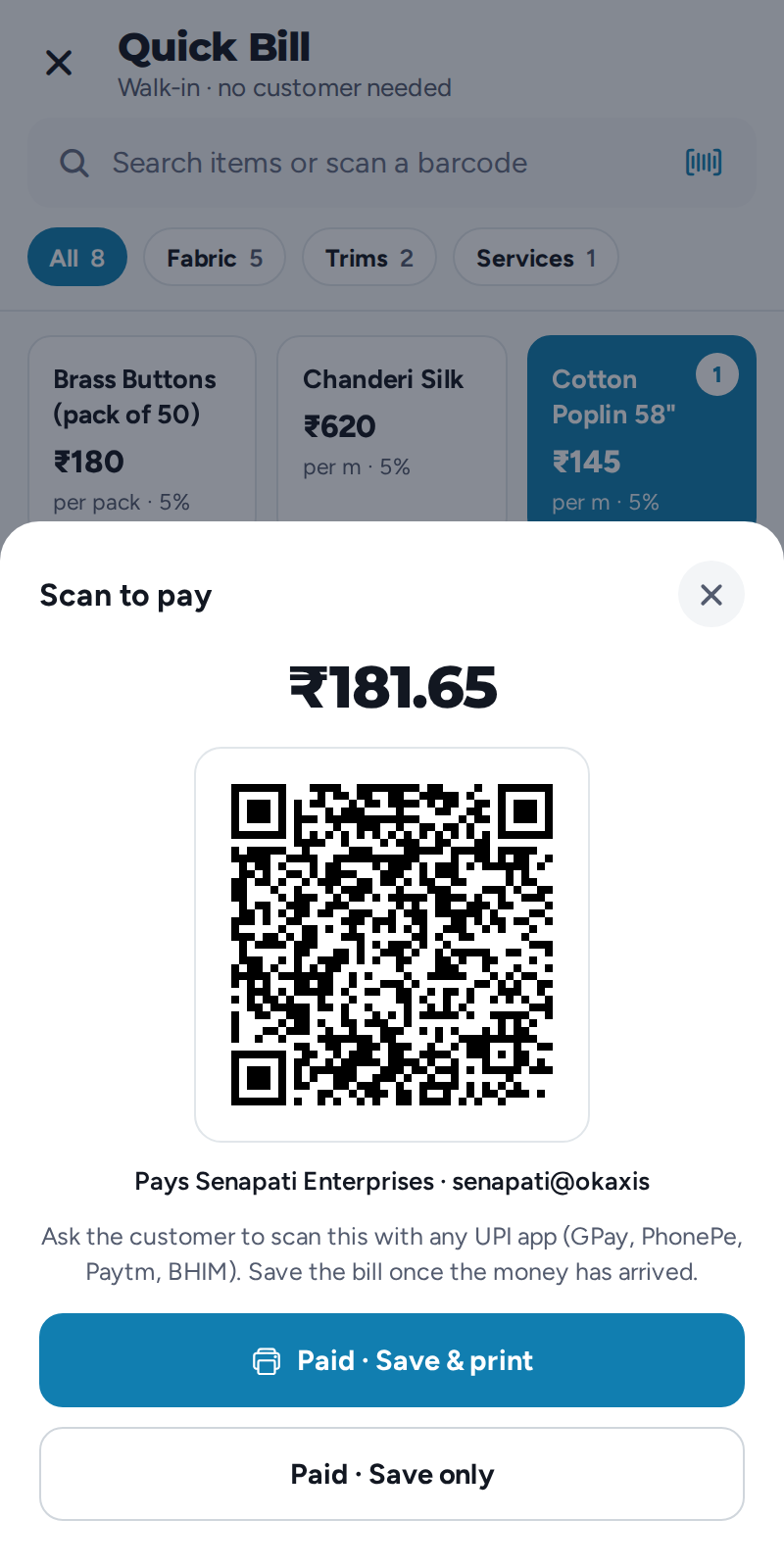
Show UPI QR puts a Scan to pay code on the screen with the bill amount already filled in. The customer scans it with any UPI app and the money goes straight to the UPI ID saved in your settings. Nothing passes through InvoiceKaro.
When the payment has reached you, press Paid · Save & print. The bill is then recorded as paid by UPI instead of cash, which keeps your cash drawer and your bank statement easy to match at the end of the day.
What a saved Quick Bill records
A quick bill is a real invoice, not a rough slip. Once it is saved online, five things have happened without a second step:
| What is recorded | Why it helps |
|---|---|
| An invoice in your normal number series | Counter sales sit in the same list as your other invoices and follow the same GST rates as the items. |
| The bill is marked paid, by cash or UPI | It counts as money collected, not as money someone owes you. |
| Stock comes down | Counts stay right without a separate stock entry. |
| The cost of the items sold is saved | Your margin on that sale stays correct even if you buy the item at a different price next month. |
| It reaches your reports | Revenue, margin and the day book all include counter sales. |
Printing the receipt
Save & print sends a receipt sized for a thermal roll. InvoiceKaro supports 58 mm and 80 mm rolls, and can print a full A4 tax invoice when a customer asks for one. Printing uses the print dialog of your browser or phone, so the printer has to be set up on that device first. The printing guide covers roll sizes and the common reasons a receipt comes out cut off.
Five habits for a faster counter
- Put your fast movers in their own category. Then one tap on that category's chip shows the twenty items you sell every hour.
- Add barcodes when you add items. Scanning beats searching the moment the shop gets busy.
- Save your UPI ID once. Then every bill can show a QR with the amount filled in. See how to set up payments.
- Record purchases as they arrive. Quick Bill takes stock off the count, and a sale beyond the count still goes through with a Check stock note. Purchase bills are what bring it in.
- Prepare for a dead connection. In a web browser you can switch on offline billing in advance and keep saving cash sales while the internet is down.