
UPI QR code on invoices: how it works and what to check
How a UPI QR on an invoice works, a QR with the amount filled in versus one without, why you check your own bank app, and UPI limits and charges as of November 2026.
In this article
Your customer has the invoice on their phone and wants to pay now. If the invoice has a UPI QR, they scan, check the amount, enter their PIN and the money is in your account in seconds. If it does not, they have to ask for your UPI ID, type it in, type the amount, and maybe get one of them wrong.
How a UPI QR works
A UPI QR is a picture of a short piece of text. That text holds your UPI ID and your name, and it can also hold an amount and a note such as the invoice number. When a customer scans it, their UPI app reads the text and fills in the payment screen. The money moves from the customer's bank to yours. The QR itself does not move money or confirm anything, which is why the same QR works with any UPI app.
With the amount filled in, or without
| QR with the amount filled in | QR without an amount | |
|---|---|---|
| What the customer does | Scans, checks, enters PIN. | Scans, types the amount, enters PIN. |
| Risk of a wrong amount | Low. The amount comes from the bill. | Higher. ₹4,500 can become ₹450. |
| Matching the payment later | Easy when the note carries the invoice number. | Harder. You match by amount and time. |
| Where it suits | A pay page, a counter screen, one particular bill. | A printed invoice, a shop sticker, any bill that may be part paid. |
A printed invoice should usually carry a QR without an amount, because the paper cannot know about a part payment made later. Say you invoice ₹18,000 and the customer pays ₹8,000 in cash. A QR asking for ₹18,000 would now ask for too much. For the balance, send a link or show a QR made for ₹10,000.
Always check the credit in your own app
A customer showing you a "payment successful" screen is not proof that the money has reached you. Before you hand over goods or mark a bill paid:
- 1Open your own bank or UPI app, or check your payment sound box if you use one.
- 2Match the amount and the time, and the note or the customer's name where shown.
- 3Note the UPI reference number against the bill, so you can trace the payment later.
- 4Only then record it as paid.
UPI limits and charges as of November 2026
These are the rules as of November 2026. They change, so confirm with your bank or the official sources listed below before you rely on them.
- Per-payment limit. The general limit for a UPI payment, to a person or to a merchant, is ₹1 lakh per transaction. Payments between people are also limited to ₹1 lakh a day.
- Higher limits for some merchants. From 15 September 2025, verified merchants in certain categories (such as capital markets, insurance, travel, collections, GeM and credit card bill payments) can take up to ₹5 lakh per payment, with up to ₹10 lakh in 24 hours in those categories (credit card bill payments are capped at ₹6 lakh a day). Ask your bank whether your business falls in one of these categories.
- Banks may set lower limits. The customer's bank can allow less than these figures, so a large payment may fail even below ₹1 lakh.
- Charges today. UPI payments from a bank account to a merchant carry no merchant discount rate (MDR). This zero rate has applied since 2020.
What it would mean, if it comes into force as announced, for a merchant outside the free and flat-rate categories: a ₹1,500 payment would carry no charge. A ₹10,000 payment would carry 0.4%, which is ₹40. An ₹80,000 payment would work out to ₹320 at 0.4%, but the cap would hold it at ₹300. For an invoice above ₹1 lakh, or above your customer's bank limit, offer bank transfer (NEFT, IMPS or RTGS) as well.
UPI QR in InvoiceKaro
- Set up once. Save a UPI ID, or upload your payment provider's QR image, in Settings → Payments & UPI. Without one of these, no QR appears. See set up how you get paid.
- Pay page. Every issued invoice with a balance has a pay link. With a UPI ID saved, its page shows a QR for the exact balance with the invoice number as the note, and a button that opens the customer's UPI app. See how customers pay.
- Invoice PDF. The QR printed on the PDF has no amount filled in, because the PDF cannot know about later payments.
- Quick Bill. Show UPI QR puts a QR for the bill total on the screen at the counter.
- Uploaded QR only. If you saved a QR image but no UPI ID, the customer types the amount.
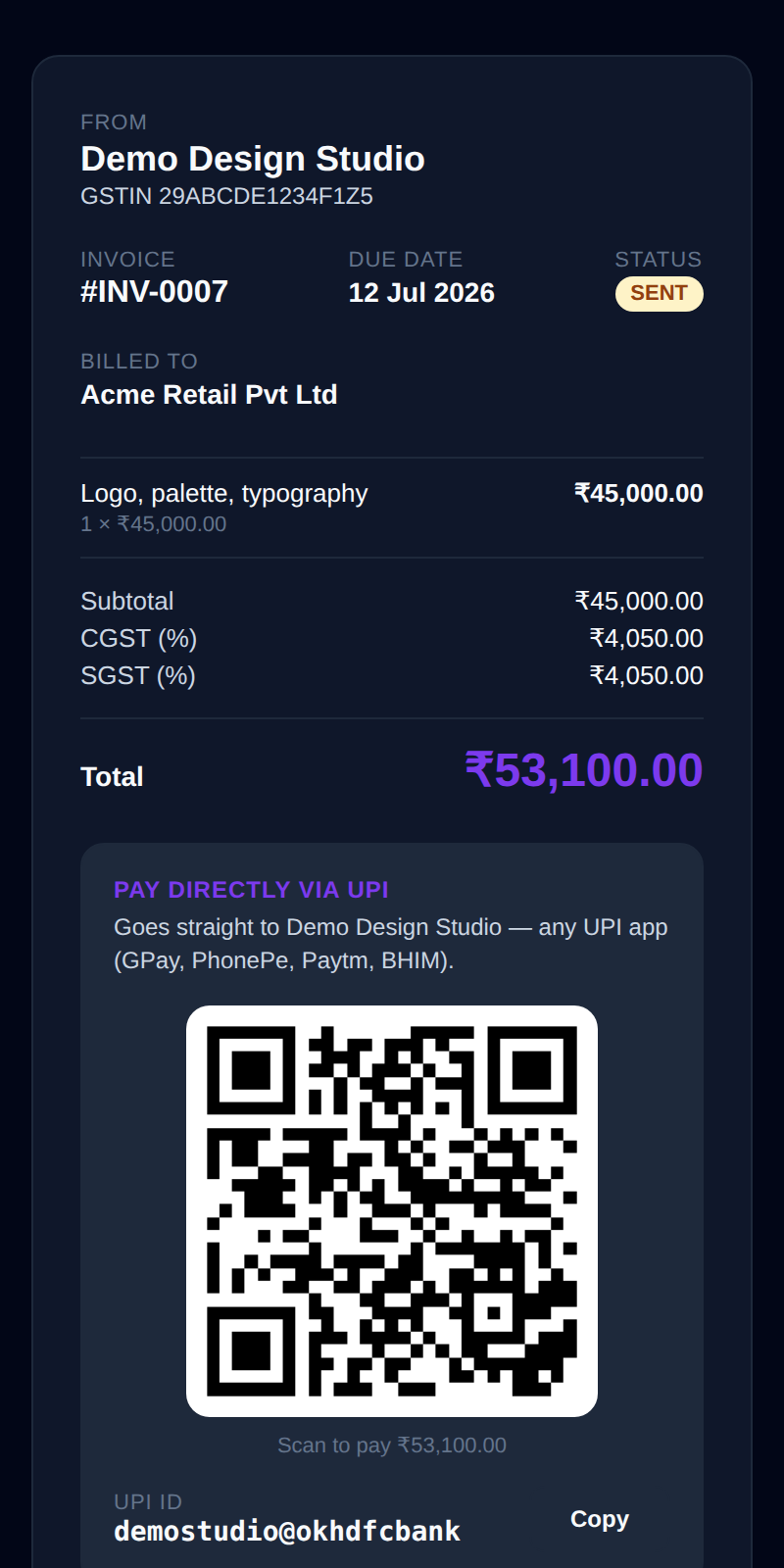
The money goes straight from the customer to your account; InvoiceKaro never holds it or sees it. So check the credit in your own app and then record the payment. See recording payments.
Common questions
Is there a charge for receiving UPI payments in my shop?+
What is the UPI limit per transaction for a business?+
Does a customer's payment screenshot prove they paid?+
Official sources
- PIB release on UPI MDR on select merchant payments (15 September 2026)
- NPCI press release: MDR to be implemented post Diwali at a date to be notified (13 October 2026)
- NPCI FAQs on MDR on select UPI P2M transactions (updated 15 October 2026)
- All India Radio News: UPI person-to-merchant limit raised to ₹5 lakh (15 September 2025)
This article is general information for small businesses, not tax or legal advice. Rules and rates change, so check the official source or ask your accountant before you act on it. InvoiceKaro does not file GST returns or generate e-invoices or e-way bills.