
Pay links and the customer portal: what each link does
The difference between an invoice pay link and a customer portal link, how to share each one, what your customer sees, and how expiry and revoking work.
In this article
A customer says, "Send me the details, I'll pay tonight." Another asks, "How much do I owe you in total?" These are two different questions, and InvoiceKaro has a different link for each. A pay link is for paying one invoice. A portal link shows a customer their whole account with you.
Mixing them up leaves a customer looking for a pay button that is not there. Here is what each link does and how to share and switch it off.
Two links, two jobs
| What | Pay link | Portal link |
|---|---|---|
| Covers | One issued invoice | One customer's whole account |
| Shows | The invoice, GST totals and the balance due | Total outstanding, their invoices with what is due on each, and their projects |
| Ways to pay | UPI QR, a button that opens a UPI app, your UPI ID and bank details | None. There is no pay button |
| Approve work | No | No. Milestones are approved from a separate approval link |
| Default expiry | 30 days | 60 days |
| Switch off | Revoke pay link | Revoke portal links |
Send a pay link
- 1Open Invoices and find the invoice. It must be issued and still have a balance. A draft gets a pay link once you send it or mark it as sent.
- 2Copy the link. Click ⋯ on the row and choose Copy pay link (on a phone, press and hold the card). Pay link copied shows when it expires.
- 3Paste it into your WhatsApp chat with the customer, an email or wherever you talk. Invoice emails sent by InvoiceKaro already include the link.
What the customer sees on the pay page
The link opens in any browser, with no app or account needed. The customer sees your business name and GSTIN, the invoice number, due date, the lines, the GST and the total. Below that come the ways to pay, depending on what you saved:
- A UPI QR with the amount and the invoice number filled in, if you saved a UPI ID. If you uploaded only a QR image, that image is shown and the customer types the amount.
- A Pay ₹… via UPI app button that opens the customer's UPI app ready to confirm. This needs a saved UPI ID.
- Bank details (account holder, account number, IFSC and bank) with a Copy button on each, if you saved a bank account.
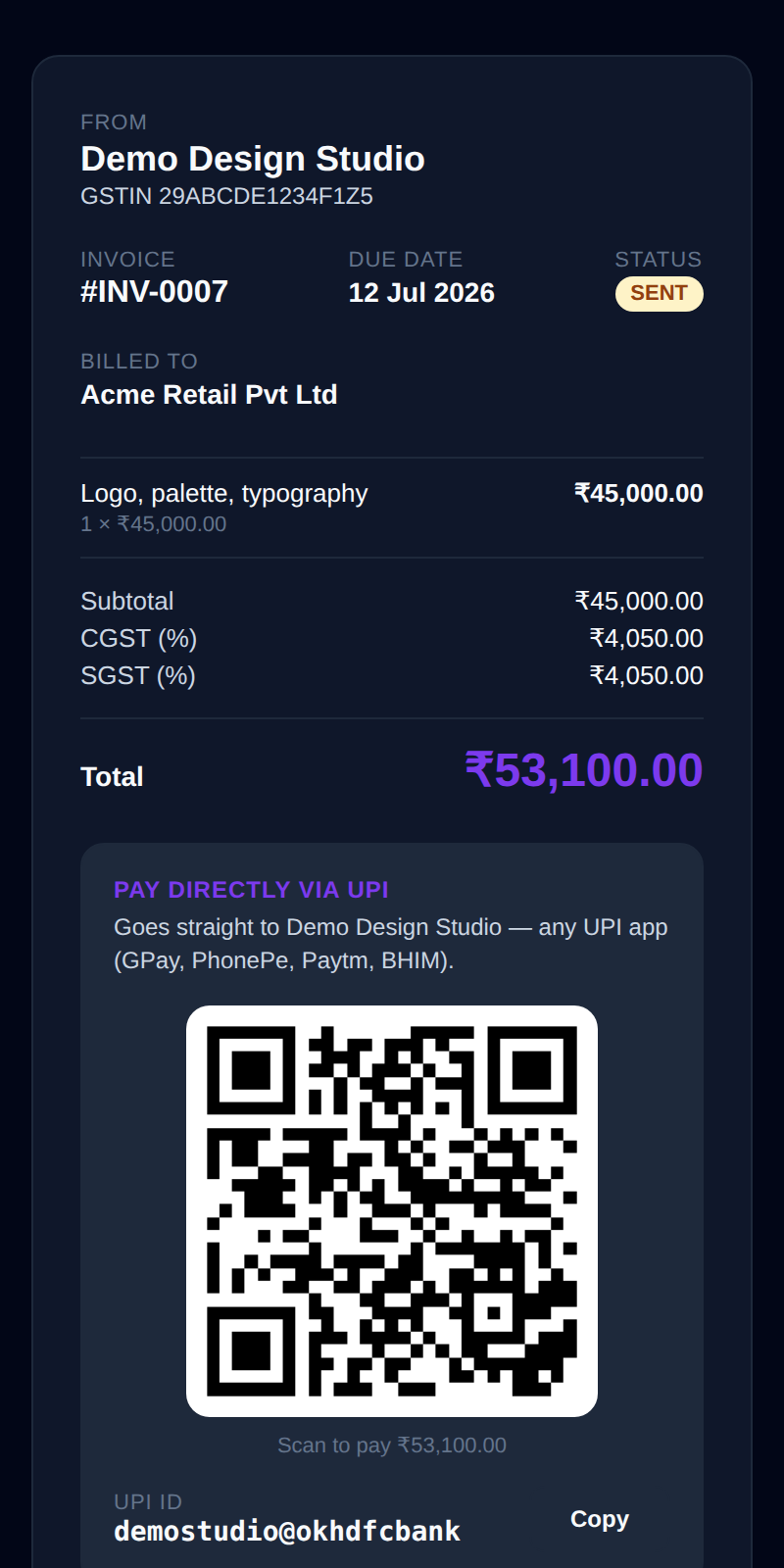
A worked example: a part payment
Say you sent a wholesaler an invoice for ₹45,000. They pay ₹20,000 by UPI and promise the rest next week.
- ₹20,000 arrives in your UPI app.
- In Payments, you click Record payment, choose the invoice, change the amount to ₹20,000, pick UPI and add the UPI reference.
- The pay page now shows Already paid ₹20,000 and Balance due ₹25,000. The QR and the UPI button ask for ₹25,000, not the full amount.
- You send the same link again next week as a reminder. When the last ₹25,000 is recorded, the invoice becomes Paid and the page shows Paid · Thank you.
Share a portal link
- 1Open Customers and click the customer.
- 2Under Customer portal, click Copy portal link and note the expiry shown.
- 3Send it only to that customer. Anyone with the link can view it until it expires.
The portal shows the customer's total outstanding, their invoices with what is still due on each, and their projects with you. It suits a buyer who wants to see every open bill in one place. To collect money, follow it with the pay link of the invoice they should pay first.
Expiry and revoking
- Pay links last 30 days by default. Copying again gives a fresh link with a new expiry; earlier links keep working until they expire or you revoke them.
- Revoke pay link in the invoice's ⋯ menu stops every link made for that invoice at once, including ones in messages you already sent. The customer sees This payment link was turned off. The invoice itself is still issued and still owed.
- Cancelling an invoice also turns off its pay links.
- Portal links last 60 days by default. Revoke portal links on the customer turns them all off.
More detail is in the guides to pay links, how customers pay and recording payments. For what to check on the QR itself, read UPI QR on invoices.