
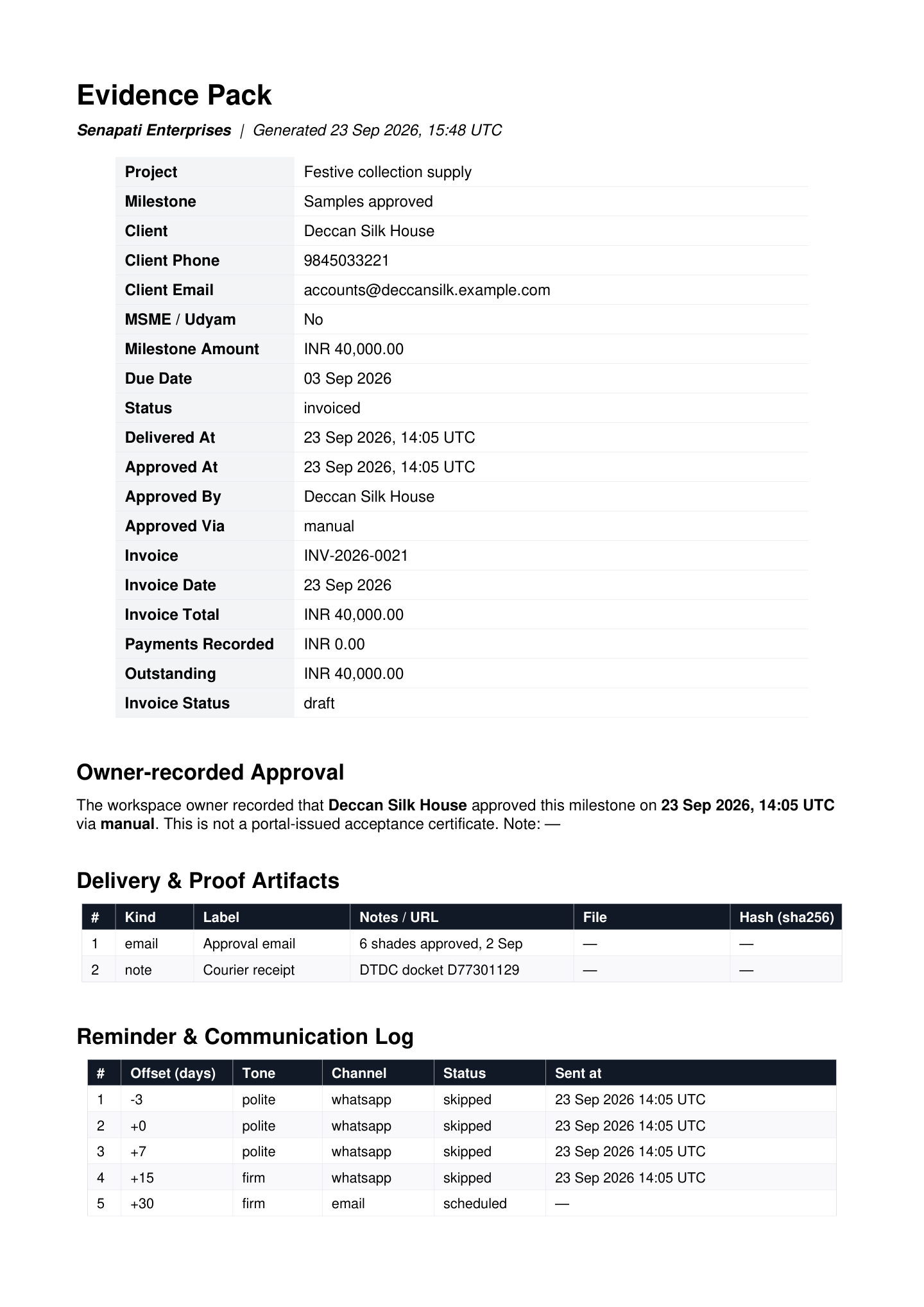
An evidence pack puts the whole story of a payment in one PDF: what was agreed, what you delivered, how the client approved it, how you followed up and what's still owed. If a client stalls, it's the document you send them, or take to an adviser.
What's inside
| Section | What it contains |
|---|---|
| Summary | The project, milestone, client contact details and MSME/Udyam status, amount, due date and status, plus when the work was delivered and approved, by whom and how. If there's an invoice: its number, date, total, payments recorded, amount outstanding and status. |
| Delivery & Proof Artifacts | Every piece of proof with its kind, label, notes or URL, and for uploaded files the file name, size and the start of its SHA-256 fingerprint. |
| Reminder & Communication Log | Every scheduled reminder with its timing, tone, channel, status and when it was sent. |
| Acceptance Certificate | When the client approved through the approval link: their name and email, the date and time, IP address, browser, the bundle SHA-256 hash, their notes and a certificate ID. An approval you recorded yourself appears as an owner-recorded approval instead. |
| Letter of Demand | Added automatically once the invoice is 30 or more days overdue and still unpaid: a formal letter asking the client to pay within 7 days, pointing to the records in the pack. |
Note
The pack describes the invoice (number, date, amounts and status) but doesn't include the invoice PDF itself. Send the invoice with it if the reader needs a copy.
Tip
A pack is only as strong as the steps before it. Attach proof, get a client approval through the link and schedule reminders, and the pack fills itself in.
Download a pack
| Pack | Where to find it | Use it when |
|---|---|---|
| One milestone | ⋯ More → Evidence Pack (PDF) on the milestone card | One stage is overdue or disputed. |
| Whole project | The Evidence pack button at the top of the project | You want every milestone in one document. It starts with a table of all the milestones, then each milestone's full pack. |
The PDF downloads straight away. The What to do next card also offers Evidence Pack once a milestone's invoice is 30 days overdue.
Monthly allowance
Every pack you download, for a milestone or a whole project, counts towards your plan's monthly allowance: 3 on the Free Trial, 10 on Starter and 50 on Professional, with high-volume limits on Enterprise. The count resets each calendar month. See Plans & billing.
Escalating an unpaid invoice
- 1At 30 days overdue, the What to do next card suggests the evidence pack. Download it: from now on it includes the Letter of Demand.
- 2Send the pack to the client along with a Final notice from the AI follow-up assistant.
- 3At 45 days overdue, the suggestion turns Critical and recommends that you consult a lawyer and serve the evidence pack and Letter of Demand.
- 4If MSME delayed-payment provisions may apply to your business, review the MSME details & payment follow-up guide and official guidance with your adviser.
Warning
The risk labels and the 45-day Critical flag count days past the invoice due date. Projects doesn't decide whether the MSMED Act applies or calculate statutory interest. The evidence pack and Letter of Demand are generated from your records; they do not guarantee legal validity, recovery or a particular outcome. Review a formal demand with a qualified adviser before using it.
Keep your records
Evidence packs are ordinary PDFs you can save anywhere, and the underlying records stay in your InvoiceKaro account. See Data & security for how your data is protected.