
Someone buys a packet of biscuits and wants a slip. You don't want to add them as a customer, pick a place of supply or fill in a GST form. You want to hand them a receipt and serve the next person. That's what Quick Bill is for.
Open Quick Bill
- On a computer: open More → Quick Bill after choosing a business type, or use the top-bar shortcut in Retail/Both and the existing layout. It opens beside the left menu, with your items on the left and This bill on the right.
- On a phone: open More → Quick Bill, whether or not a business type is selected. Retail, Both and the existing layout also have the floating Quick Bill | Invoice shortcut outside Settings and open forms. Services shows New Invoice there instead.
Ring up a sale
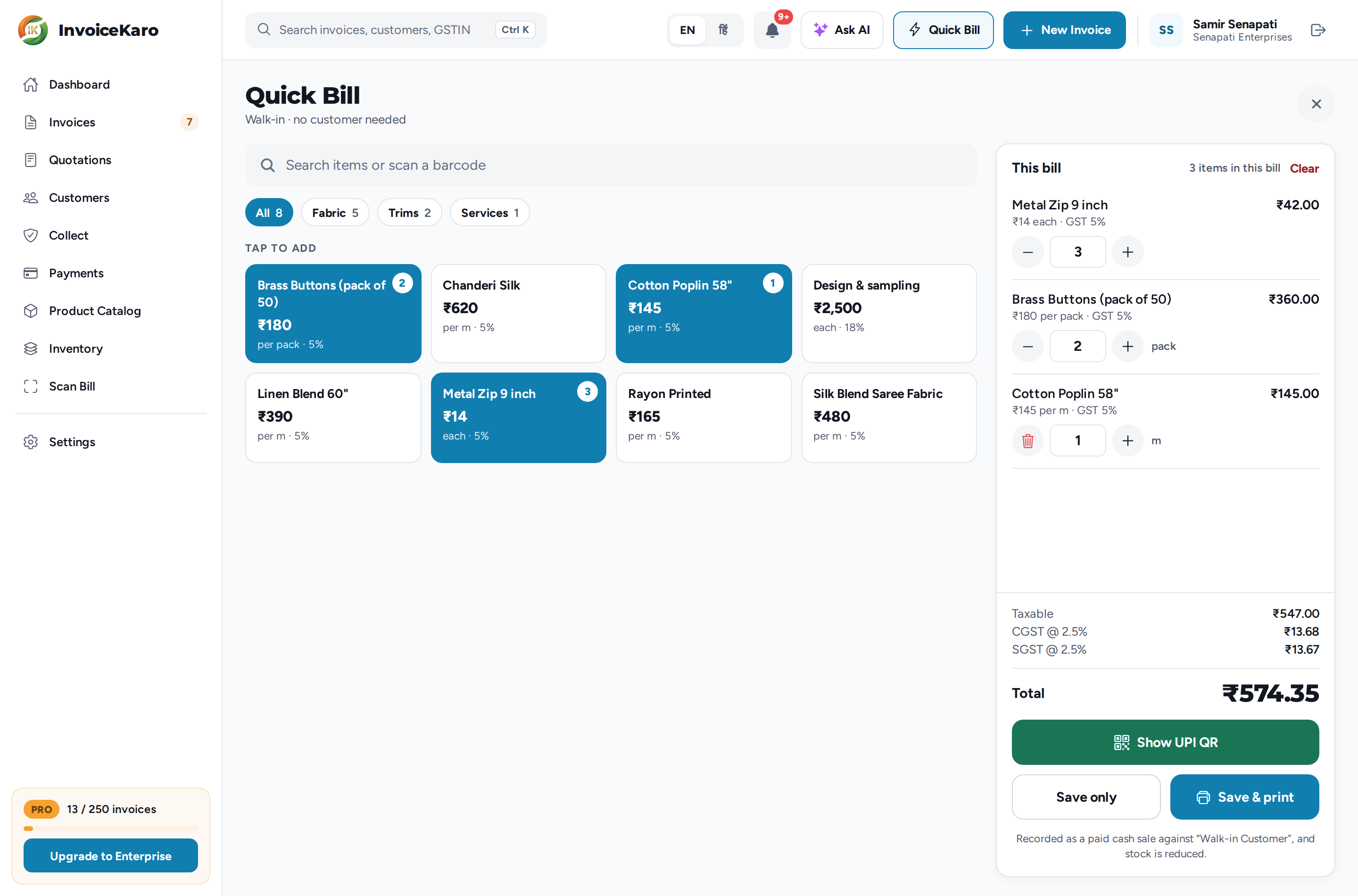
- 1Add the items: your Product Catalog appears as tiles under Tap to add, with a chip for each category. Tap an item to add it, and tap it again to add one more. You can also search in Search items or scan a barcode.
- 2Fix a quantity if you need to: use − and + on the line, or type the quantity. Decimals work, such as 2.5 m of cloth. Taking a line down to zero removes it.
- 3Check the total: Taxable, CGST, SGST and the Total sit at the bottom in large type, so you can read it across a counter. On a phone, tap Review on the item count to see the lines.
- 4Take the money: for cash, click Save & print to save the bill and print a receipt, or Save only. For UPI, use Show UPI QR (below).
Take payment by UPI
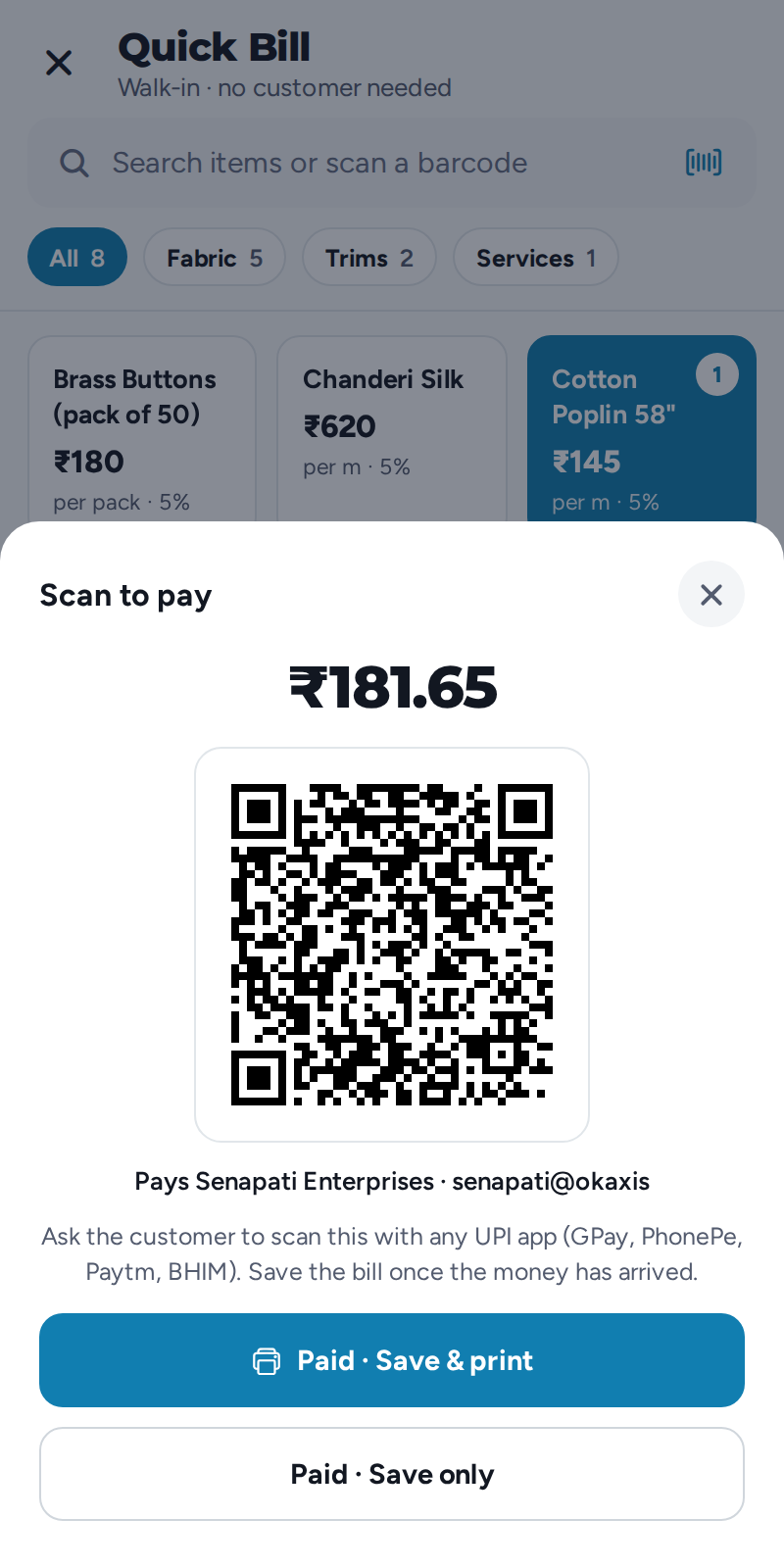
Click Show UPI QR. A Scan to pay QR appears with the amount already filled in, paying the UPI ID in Settings → Payments & UPI (on a phone, the Payments & UPI card on More → Settings). The customer scans it with any UPI app. Once the money has arrived, click Paid · Save & print or Paid · Save only. The sale is then recorded as paid by UPI rather than cash.
- Only a saved QR image, no UPI ID? Quick Bill shows that QR instead, and the customer types in the amount.
- Neither? You'll see Add your UPI ID first. The owner can tap Add UPI ID; anyone else needs to ask the owner. See Set up how you get paid.
Straight on to the next sale
Quick Bill stays open after you save. A Bill saved · paid card shows the invoice number and total, the cart is cleared and ready for the next customer, and Print receipt (roll) prints that bill again if the first one jammed. To leave, click the ✕. If there are unsaved items on the bill you'll be asked first, and can choose Close and clear or Keep billing.
What happens when an online save completes
After the server confirms both invoice creation and payment recording, Quick Bill shows Bill saved · paid. The completed sale records:
| What's recorded | Why it matters |
|---|---|
An invoice numbered from your normal series (such as INV-2026-0028) | Counter sales appear in Invoices and the relevant reports. Its GST follows the item rates. |
| The bill is marked paid, in cash or by UPI | It shows up as collected, not as money someone owes you. |
| Stock comes down | Your counts stay right without a separate step. |
| The cost of the sale is saved | The current average cost is captured for the sale; later purchases do not rewrite that cost. |
| It reaches your reports | Revenue, margin and the day book all include counter sales. |
Cash sales without internet
Prepare the device for offline billing while online. When the connection is unavailable, Quick Bill uses the saved catalogue and offers Save cash sale offline. Use it only after receiving cash. Cash sale saved on this device confirms a local save with a local reference; UPI confirmation and a final invoice number need a connection.
On reconnection, the queue automatically creates the invoice and records the cash payment using the saved sale time. Server stock changes and cost recording happen when that sync completes, using the cost available then. Until then, online stock counts and reports do not include the sale, and cached stock may be out of date. Check any bill marked for review and keep the device's data until it is synced.
The Walk-in Customer
Every quick bill is filed against a single reusable party called Walk-in Customer, created for you the first time you use Quick Bill. You never have to pick it.
- It's created even if you've reached your plan's customer limit, so Quick Bill never stops for that.
- It never receives payment reminders. There's nobody to remind.
- There's only ever one, however busy the counter gets. In Customers it's marked System, and its name can't be changed.
Short stock doesn't stop the sale
If you bill more than the count says you hold, the sale still goes through. The Bill saved · paid card adds a Check stock: line naming the item, how many were in stock and how many you billed. The customer is already walking away with the goods, so correct the count when the queue clears.
Printing receipts
Save & print asks which roll your printer takes, 80mm (standard) or 58mm (small), and prints a receipt sized for it rather than an A4 page. Any invoice can be printed as a receipt later too. See Printing and receipts.
Quick Bill or a full invoice?
| Use Quick Bill when | Use a full invoice when |
|---|---|
| A walk-in pays at the counter, in cash or by UPI | The buyer needs their name and GSTIN on the document |
| You want a receipt in seconds | You're billing on credit and will chase payment |
| The customer's details don't matter | You need payment terms, due dates or reminders |
| The sale is within your own state (Quick Bill always charges CGST + SGST) | The buyer is in another state and IGST applies |
| The items are in your Product Catalog | You're selling a phone or appliance whose IMEI or serial must go on the bill |
For a full invoice, see Creating invoices.