
Nobody enjoys chasing payments. Projects handles the routine follow-ups with a reminder schedule on each milestone. When you'd rather write to the client yourself, the AI follow-up assistant drafts the message for you.
Schedule default reminders
- 1Make sure the milestone has a due date. Reminders are timed from it.
- 2On the milestone card, open ⋯ More and choose Schedule default reminders. Once the milestone has an invoice, the What to do next card offers the same thing as + Default reminders.
- 3InvoiceKaro adds six reminders to the milestone and tells you how many it created.
| When | Tone | Sent by |
|---|---|---|
| 3 days before the due date | Polite | |
| On the due date | Polite | |
| 7 days after | Polite | |
| 15 days after | Firm | |
| 30 days after | Firm | |
| 45 days after | Final |
InvoiceKaro attempts each reminder when it becomes due, using the WhatsApp number or email address saved on the customer. Once the milestone has an invoice, a WhatsApp reminder includes the amount, business name, invoice number and due date; an email reminder uses the scheduled tone and includes the pay link. Delivery depends on the messaging service and customer contact details, so check the status. Running Schedule default reminders again only adds reminders that are missing.
Reading a reminder's status
Each reminder appears on the milestone card as a small label such as 3d before due · polite · WhatsApp · scheduled. The last part is its status: scheduled, sent, skipped with the reason (for example skipped · no due date or skipped · already paid), or failed. Until the milestone is approved, you can delete a reminder with its ✕.
The AI follow-up assistant
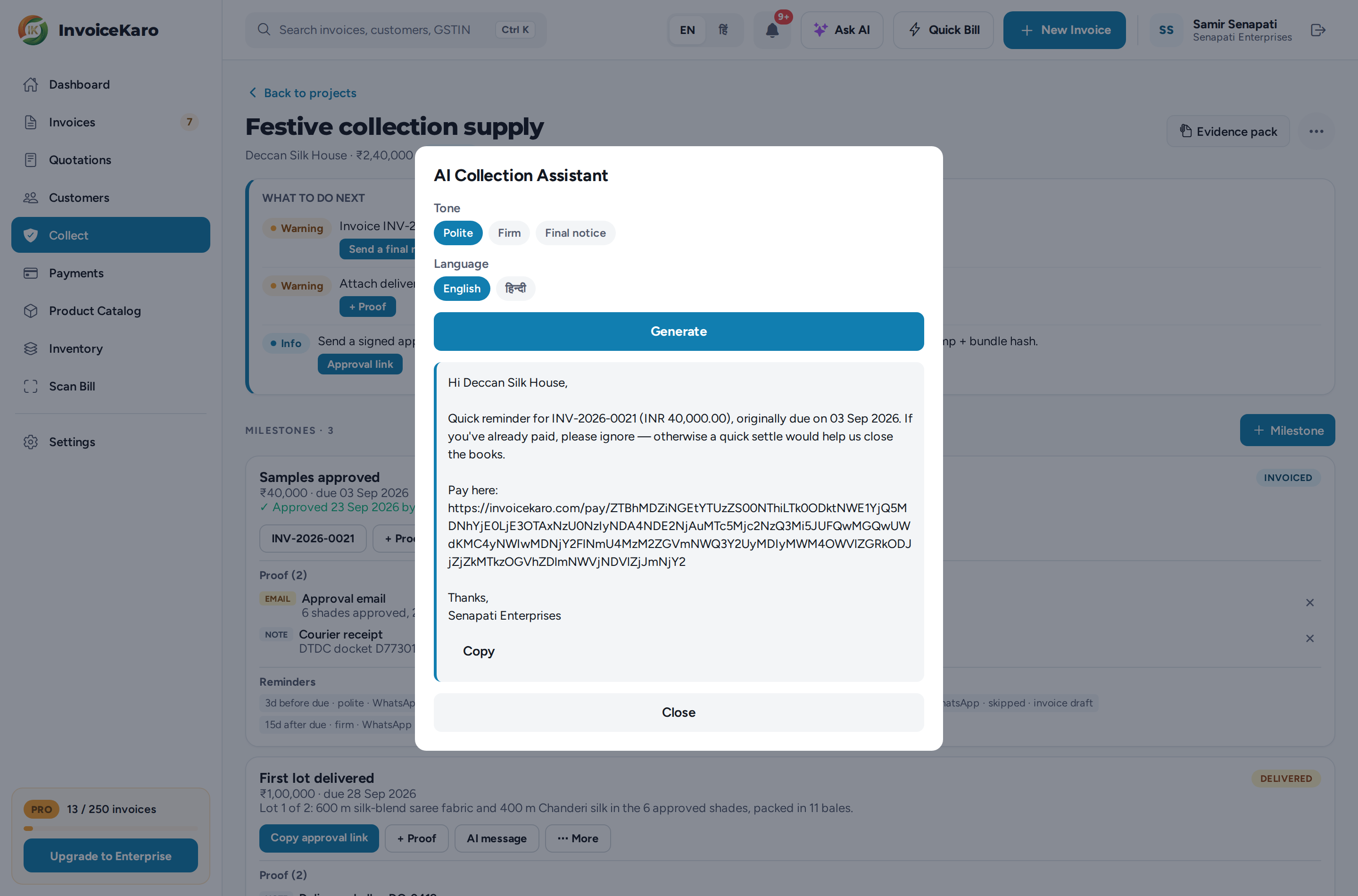
When you want to send a message yourself, the AI follow-up assistant writes it for the milestone. It uses the client's name, the amount, the due date and how late it is, plus the invoice number and pay link if the milestone has an invoice.
- 1On the milestone card, click AI message.
- 2Pick a Tone: Polite, Firm or Final notice.
- 3Pick a Language: English or हिन्दी.
- 4Click Generate. The draft appears below, written for WhatsApp.
- 5Click Copy, paste it into WhatsApp or an email, and send it yourself. The assistant never sends anything on its own.
| Tone | Best for |
|---|---|
| Polite | A friendly nudge around the due date. |
| Firm | A clearer follow-up once the payment is properly late. |
| Final notice | A last, serious message before you escalate. |
Reminders are part of your record
The milestone's evidence pack lists scheduled reminders with their timing, tone, channel, status and recorded send time. A send record does not establish that the client read the message. Messages you copy from the AI follow-up assistant and send yourself aren't logged, so keep your own copy of those.